
Document translation
that keeps the layout
Upload a PDF, Word, Excel or PowerPoint file, an image or a scan — the translation comes back looking like the original: fonts, images and tables stay in place. Long documents run in chunks with live progress, then a review editor lets you check every block before your team delivers.
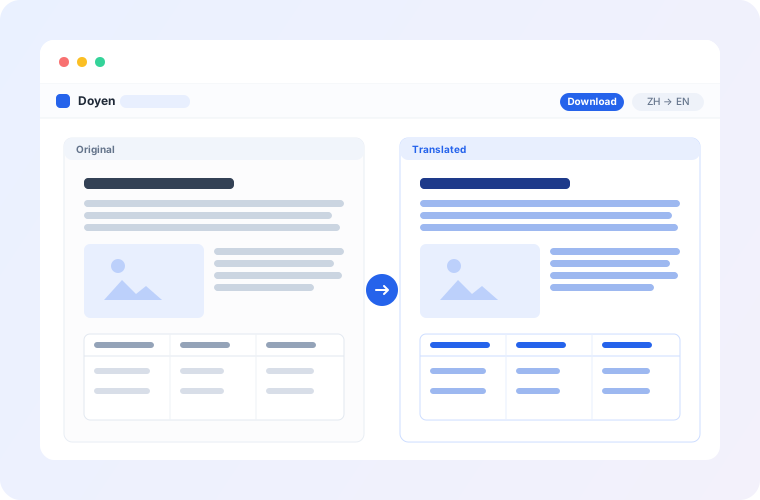
From raw translation to a finished file
Machine translation, human review and team hand-off — the whole workflow in one place.
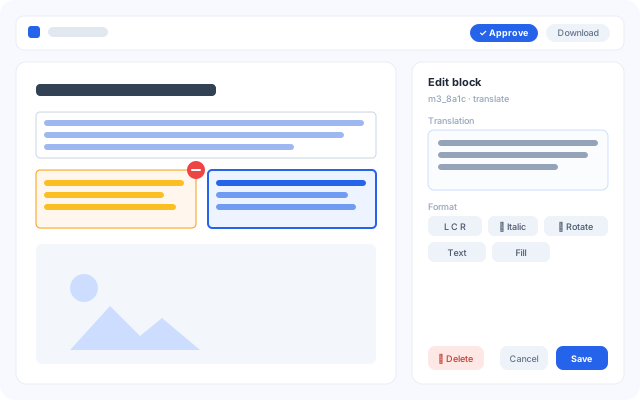
Review translations like a design tool
Pages and layers on the left, source and translation side by side, a properties panel on the right — every translated passage is an editable block. Rewrite it, change the font, size, alignment or colour, drag it into place. Missed something? Select the area and it's read and translated on the spot.
- Blocks that need a look are flagged for you to confirm one by one
- Auto-save, undo for every step, and revert any single change
- Find & replace plus glossaries: fix a term once, everywhere
- Download unlocks on approval, and every version stays retrievable
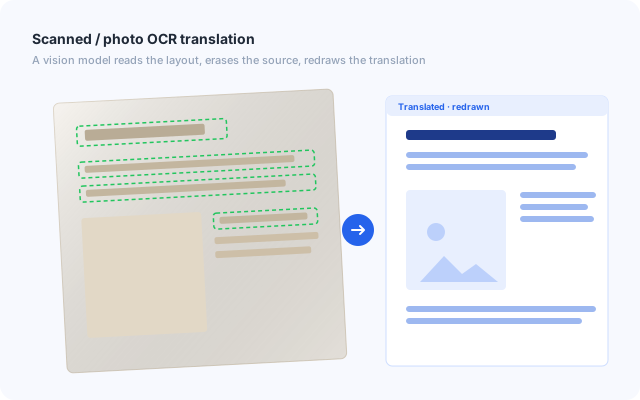
Scans and photos translate too
A vision model reads the page layout, erases the original text and redraws the translation in place — scanned contracts, photographed drawings and image-only PDFs come back clean, with their layout intact.
- Finds layout regions and reading order automatically
- Maths formulas are recognised and re-typeset; pictures and seals stay as they are
- Images in (JPG, PNG and more), images out in the same format
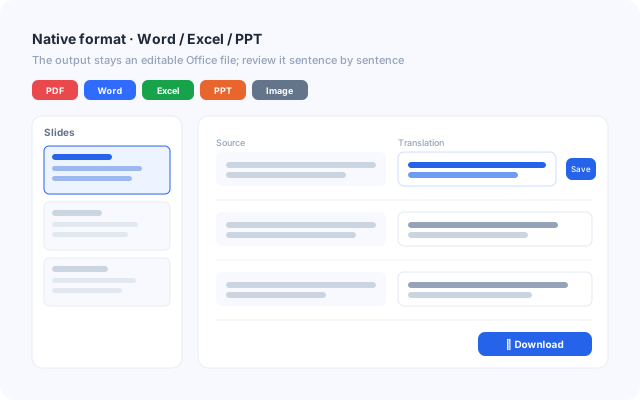
Word, Excel and PowerPoint stay Office files
Office documents come back as editable files in their own format — not images, not PDFs. Review the translation as a list of sentences; saving regenerates the file, so the layout is handled by Office itself.
- Review by slide, sheet or paragraph
- Only text that needs translating is translated — formulas and numbers are left alone
- One-click download after approval, with earlier versions kept
One project, the whole team in step
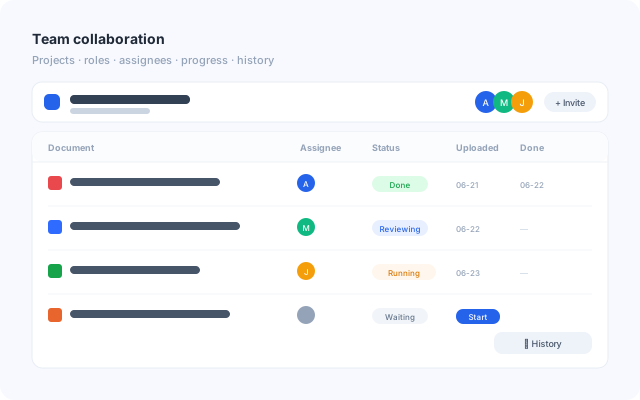
Organise documents into projects, assign owners and set member roles (owner, editor, viewer), and see every document move from upload to translation, review and done.
- Project- and document-level permissions keep data where it belongs
- The assignee starts the run; progress is visible throughout
- Team and project glossaries keep terminology consistent across the team
Hundreds of pages, finished reliably
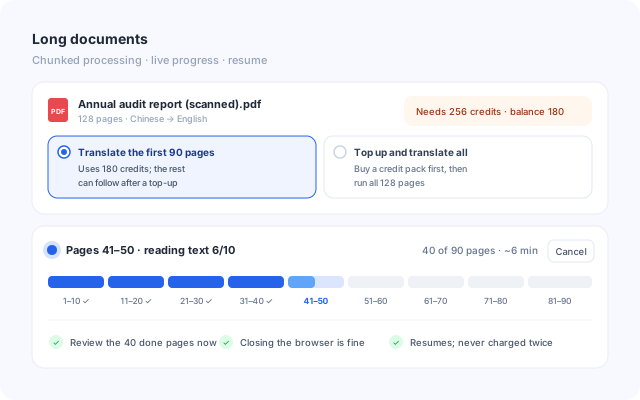
Documents run in chunks of 10 pages, each saved as soon as it's done. Before you start you see how many credits it needs; if your balance falls short, translate what it covers now and the rest after a top-up.
- Live progress: which pages are running and roughly how long is left
- Cancel any time — finished pages are ready to review
- Close the browser, no problem; an interrupted run resumes where it stopped and is never charged twice
And there's more
One platform for every part of document translation.
Layout preserved
Fonts, images and tables stay in place — the translation reads like a native document.
70+ languages
Built on large language models; pair any source and target language for natural-sounding results.
Every format
PDF, Word, Excel, PowerPoint, TXT, images and scans — files up to 250 MB.
Two-level glossaries
A team glossary everyone shares, project glossaries that override it — applied automatically.
Formulas re-typeset
Maths in scanned documents is recognised and typeset properly, not turned into gibberish.
See the cost first
The credits a document needs are shown before you start; short on credits, translate just what they cover.
Resume anywhere
Chunked and saved as it goes — a canceled or interrupted run picks up where it stopped, with no double charge.
History & versions
Every edit is traceable and reversible; approved versions are kept for download.
Your data, contained
Project-level permissions and private storage — documents are visible to your team only.
Why Doyen
One product that grows from a single user to a whole team — no editions, nothing held back.
Better results
LLM translation plus OCR layout understanding: accurate, and clean to look at.
Smoother teamwork
Projects, roles, assignees, progress and version history at a glance.
More features, fewer limits
Core features are open to everyone — no upgrade needed for the basics.
Pay for what you use
One credit system: subscribe or top up as you go.
Simple, transparent pricing
One credit system for individuals and teams — subscribe, or top up when you need to. Prices in CNY.
- All core translation features
- The review editor
- Glossaries and teams
- A fixed monthly credit allowance
- Member discount on credit packs
- 1, 3, 6, 12 or 24 months
- 600 / 1,100 / 3,500 …
- Cheaper for members
- Your balance never expires
- Members and roles
- Shared credits and batch processing
- Dedicated support
Built for teams like these
Wherever you need to understand a foreign-language document and keep its layout.
Three steps to a finished file
Upload
Pick the language pair and drop your files into a project — several at once is fine.
Check the credits, start
See what it costs before it runs; follow the progress live and cancel any time.
Review and download
Confirm the translation block by block in the editor, approve, and download the file in its original format.
Join the waitlist
Doyen is open to invited users for now. Leave your e-mail and we'll send you an invite link as soon as there's room.
- 100 credits when you're invited, every feature included
- Asking for a team? Mention its size in the note
- Already have an account? Sign in
You're on the list
Thanks! We'll send your invite link to as soon as there's room.